Profile Tab:
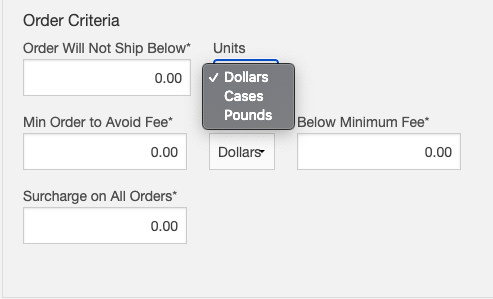
The Order Criteria section of your Profile Tab allows you to set default order minimums and surcharges for all customers associated to your software.
Values entered in this section are default, but will be trumped by values entered within your customer profile on the Customer Tab.
In order for any changes to take effect please ensure you scroll down to the bottom of the page and click save.
Order Criteria Value Options:
- Dollars: Order minimum based on dollar value of customer order.
- Cases: Order minimum based on case/piece amount in customer order.
- Pounds: Order minimum based on total weight of customer order.
Order Criteria Values Are Required:
The order criteria section of your Profile Tab is required. If you do not have order minimums or surcharges please place zeros in each field. Ensure you click save at the bottom of the page after any changes are made.
Comments
0 comments
Please sign in to leave a comment.